# 【重要】充值说明

\*此教程以TRC20通道的USDT为例，TRC20是指TRON网络。如果要充值其他币种，请选择相应的币种。如果通过其他通道充值，请选择相应的链类型。

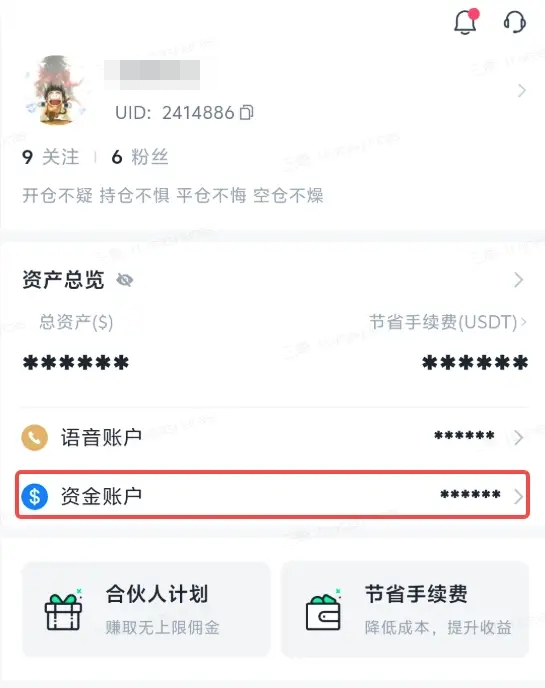
（1）进入BitFrog，点击【资金账户】

<figure><img src="/files/I91OVqlY2WgVIAB55Zbl" alt="" width="273"><figcaption></figcaption></figure>

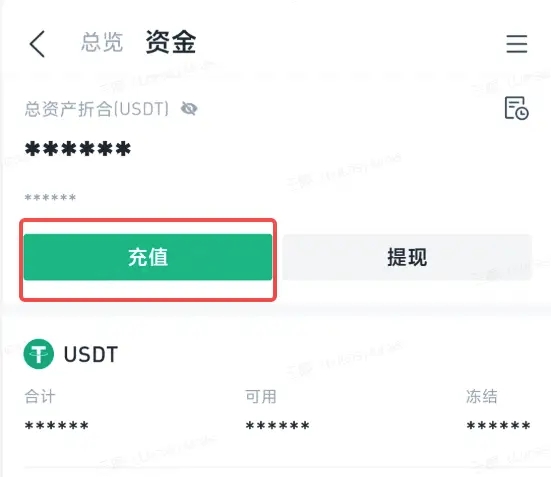
（2）选择【充值】，进入充值页面

<figure><img src="/files/gA3Cq2vxw0U4UXdFfBSV" alt="" width="276"><figcaption></figcaption></figure>

​\
\
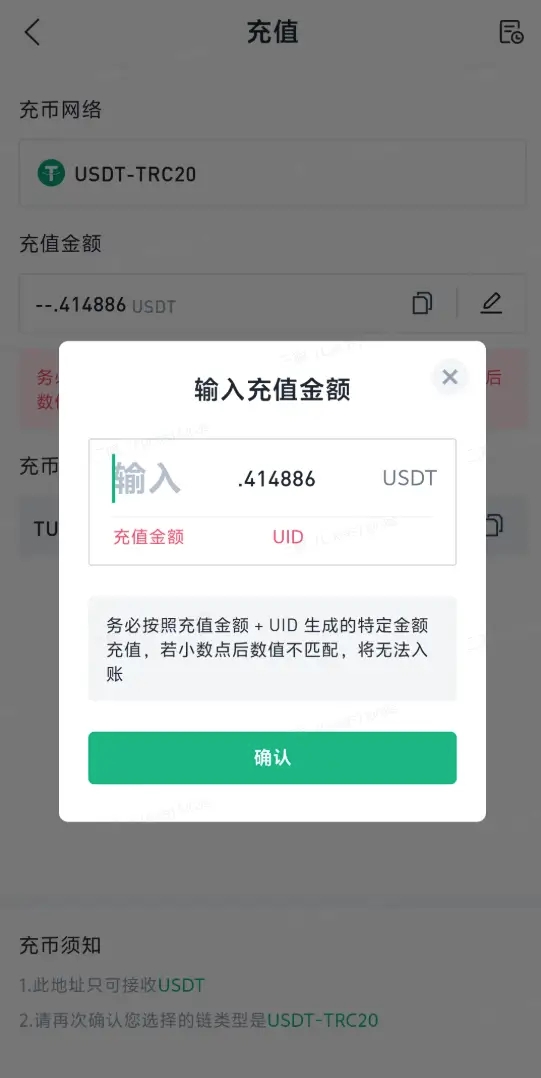
（3）输入充值金额后确定

<figure><img src="/files/XyiRv6aaLQF4zx0QzN7v" alt="" width="271"><figcaption></figcaption></figure>

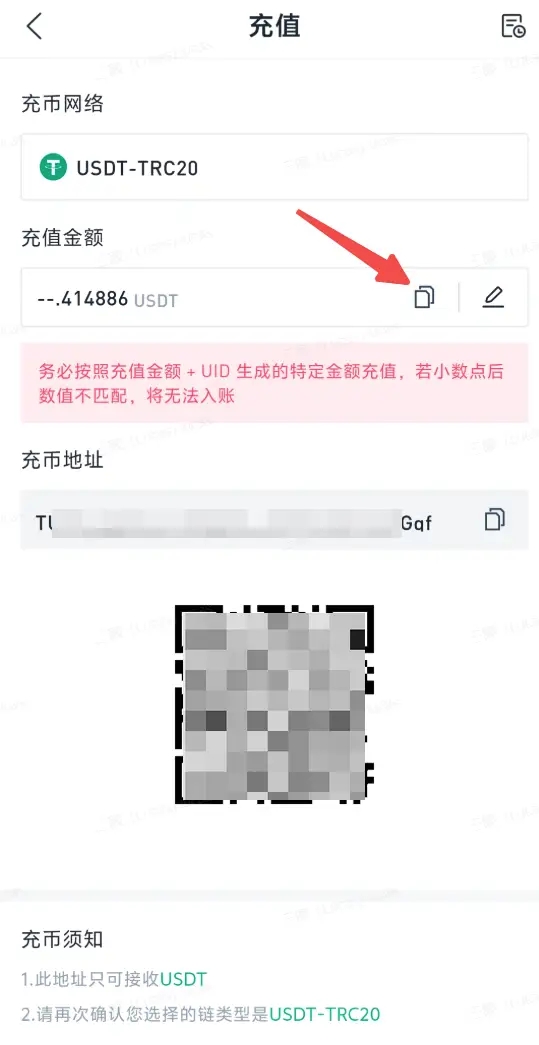
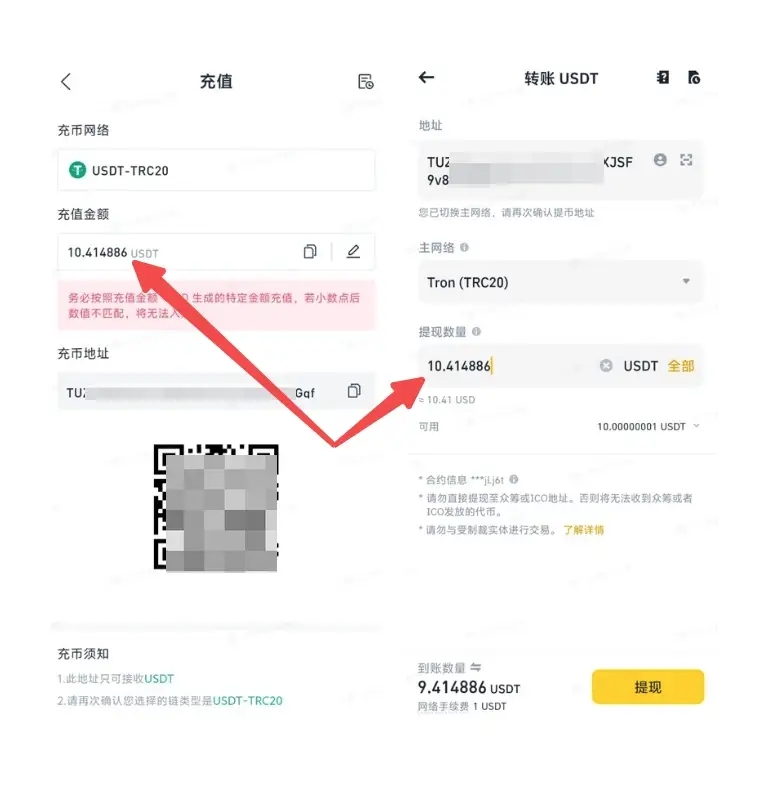
（4）点击复制充值金额回到交易所或钱包进行转账（<mark style="background-color:orange;">充值金额小数点后的需要一并填写否则无法上账</mark>）

<figure><img src="/files/KwLhBpsfGxPggCbGpiCI" alt="" width="270"><figcaption></figcaption></figure>

（5）<mark style="background-color:orange;">确保充值金额与BitFrog金额一致否则无法上账</mark>

<figure><img src="/files/htgmA4o5Ip6IvGMm0BjW" alt="" width="375"><figcaption></figcaption></figure>

\
（6）请注意，无论您选择充值或提取到第三方平台，还是到您的数字钱包，您需要确保以下 下事项：

* 钱包/平台的兼容性：即对该网络的支持；如果目标平台不支持您的提取网络，将导致资产无法找回。
* 您充值提取的网络和目标平台是一致的；若对方平台仅支持ERC20通道，您需要选择ERC20通道。
* 请选择与地址匹配的通道，**而非手续费最低的通道**。

由于区块网络匿名和私密，一旦输入错误信息，您将损失相应资产。请务必仔细核对您的充值及提取地址。


---

# Agent Instructions: Querying This Documentation

If you need additional information that is not directly available in this page, you can query the documentation dynamically by asking a question.

Perform an HTTP GET request on the current page URL with the `ask` query parameter:

```
GET https://docs.bitfrog.io/zh-tw/jiao-yi-zhi-nan/chong-ti-bi/zhong-yao-chong-zhi-shuo-ming.md?ask=<question>
```

The question should be specific, self-contained, and written in natural language.
The response will contain a direct answer to the question and relevant excerpts and sources from the documentation.

Use this mechanism when the answer is not explicitly present in the current page, you need clarification or additional context, or you want to retrieve related documentation sections.