# 提幣教學

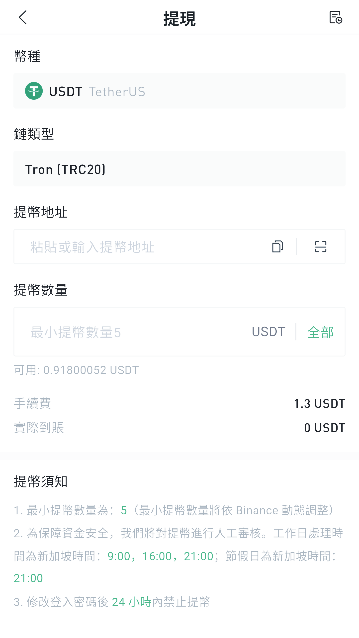
\*本教學以 TRC20 通道的 USDT 為例，TRC20 指 TRON 網路。若提取其他幣種，請選擇對應幣種；若透過其他通道提幣，請選擇對應的鏈類型。

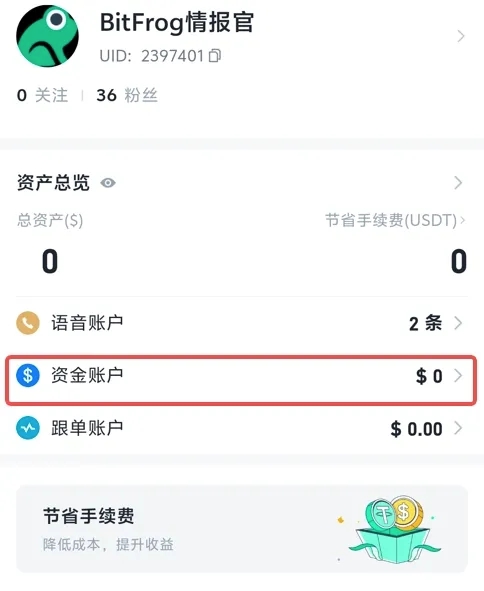
* 進入 APP【我的】，點擊【資產管理】

  <figure><img src="/files/kY6Df3yTlgdnz2NuWWwm" alt="" width="242"><figcaption></figcaption></figure>
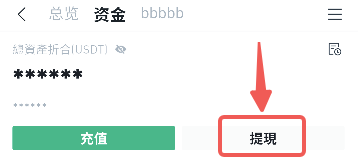
* 點擊【提現】。

  &#x20;

  <figure><img src="/files/gkmG1WhLtVOwRcUfNqVb" alt="" width="241"><figcaption></figcaption></figure>
* 選擇提現幣種

  <figure><img src="/files/nMB9NWKQ7fjXMmsl7hnS" alt="" width="375"><figcaption></figcaption></figure>

1）由於提幣需要向鏈上礦工支付一筆費用，因此提幣將收取提幣手續費（您可在提幣頁面查看當前提幣手續費）。

（2）為了保障資金安全，我們將對提幣進行人工審核，處理時間節點分別為：09:00、16:00、21:00（GMT+8）。

（3）修改登入密碼後的 24 小時內禁止提幣。

（4）請確保您提幣所選網路與目標平台一致；若您選擇的目標地址為以太坊網路，但鏈通道選擇為 TRC20，您的數位資產可能無法找回。

（5）提幣前請確認提幣地址及提幣金額正確無誤。

提幣成功後，您可在提幣頁面右側查看最近 10 筆提幣紀錄；點擊操作欄中的【全部紀錄】按鈕，可查看詳細資訊。

#### 提幣須知

* 最低提幣數量將根據鏈上情況動態調整。
* 為保障資金安全，我們將對提幣進行人工審核，處理時間節點分別為新加坡時間 09:00、16:00、21:00。
* 修改登入密碼後的 24 小時內禁止提幣。


---

# Agent Instructions: Querying This Documentation

If you need additional information that is not directly available in this page, you can query the documentation dynamically by asking a question.

Perform an HTTP GET request on the current page URL with the `ask` query parameter:

```
GET https://docs.bitfrog.io/zh-tw/jiao-yi-zhi-nan/chong-ti-bi/ti-bi-jiao-xue.md?ask=<question>
```

The question should be specific, self-contained, and written in natural language.
The response will contain a direct answer to the question and relevant excerpts and sources from the documentation.

Use this mechanism when the answer is not explicitly present in the current page, you need clarification or additional context, or you want to retrieve related documentation sections.