BitFrog Signal Strategy Alert Specifications
PineScript™ Script Overview: "Strategy" vs. "Indicator"
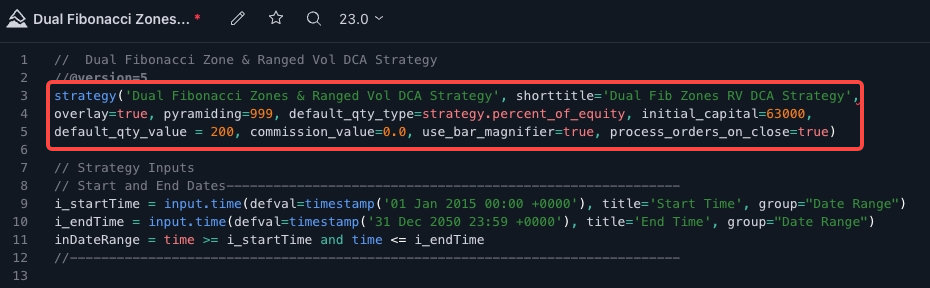
PineScript strategies can be used for both backtesting on historical data and forward testing in live markets. In addition to performing indicator calculations, strategies include calls to strategy.*()functions, which send trading orders to the PineScript™ broker emulator. The emulator can then simulate the execution of these orders. The results of the backtest are visualized in the "Strategy Tester" tab at the bottom of the chart, which is located next to the "PineScript Editor" tab.
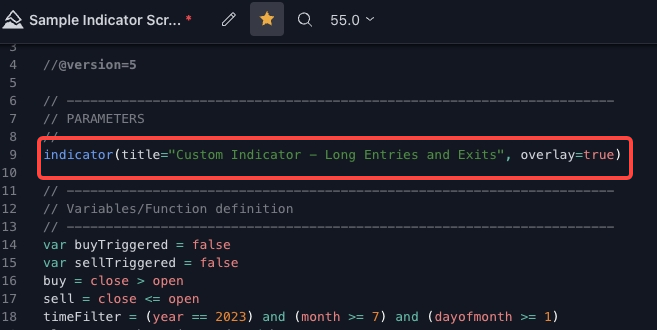
On the other hand, PineScript indicators also perform calculations but are not used for backtesting. Because they operate independently of the broker emulator, indicators consume fewer resources and execute faster.
Please note that you have the flexibility to use the format in either Section A or Section B – both are fully compatible. Depending on the information you transmit, the system will intelligently identify which format is being used and parse your message accordingly. This smart processing ensures a seamless experience regardless of which option you choose.
Section A – For PineScript™ Strategy Users
The following specifications are tailored for users who write algorithms using PineScript™ strategies (primarily strategy.* functions). This format is specifically designed to accommodate strategy placeholder values, ensuring seamless adaptability. For an in-depth understanding of strategy scripts and the process of sending alerts using strategy placeholder variables, please visit the link for more information.
If you are new to this concept, Section B – Universal Compatibility provides an alternative method for structuring alerts that applies to a wider range of scenarios.
Alert Message Specification Overview
1. "Alert Message" – ID
{ "action": "{{strategy.order.action}}", "amount": "{{strategy.order.contracts}}", "id": "{{strategy.order.id}}", //👈id - 订单标识符 "instrument": "{{ticker}}", "investmentType": "base", "marketPosition": "{{strategy.market_position}}", "marketPositionSize": "{{strategy.market_position_size}}", "maxLag": "60", "orderType": "limit", "orderPriceOffset": "0", "prevMarketPosition": "{{strategy.prev_market_position}}", "prevMarketPositionSize": "{{strategy.prev_market_position_size}}", "signalToken": "fb16aaeb4d5e2e5d36a6eacd66d06635", "timestamp": "{{timenow}}" }
ID – Order Identifier
{{strategy.order.id}} – Returns the ID of the executed order (the string used as the first argument in the function call that generated the order: strategy.entry, strategy.exit, or strategy.order).
2. "Alert Message" – Action
{ "action": "{{strategy.order.action}}", //👈操作 - "买入"或"卖出"? "amount": "{{strategy.order.contracts}}", "id": "{{strategy.order.id}}", "instrument": "{{ticker}}", "investmentType": "base", "marketPosition": "{{strategy.market_position}}", "marketPositionSize": "{{strategy.market_position_size}}", "maxLag": "60", "orderType": "limit", "orderPriceOffset": "0", "prevMarketPosition": "{{strategy.prev_market_position}}", "prevMarketPositionSize": "{{strategy.prev_market_position_size}}", "signalToken": "fb16aaeb4d5e2e5d36a6eacd66d06635", "timestamp": "{{timenow}}" }
Action – "Buy" or "Sell"?
{{strategy.order.action}} – Returns the string "buy" or "sell" for the executed order.
3. "Alert Message" – Market Position
{ "action": "{{strategy.order.action}}", "amount": "{{strategy.order.contracts}}", "id": "{{strategy.order.id}}", "instrument": "{{ticker}}", "investmentType": "base", "marketPosition": "{{strategy.market_position}}", //👈marketPosition - 预期仓位状态(订单执行时) "marketPositionSize": "{{strategy.market_position_size}}", "maxLag": "60", "orderType": "limit", "orderPriceOffset": "0", "prevMarketPosition": "{{strategy.prev_market_position}}", "prevMarketPositionSize": "{{strategy.prev_market_position_size}}", "signalToken": "fb16aaeb4d5e2e5d36a6eacd66d06635", "timestamp": "{{timenow}}" }
Market Position – Expected Position Status (at Order Execution Time)
{{strategy.market_position}} – Returns the current position of the strategy as a string: "long", "flat", or "short".
4. "Alert Message" – Previous Market Position
{ "action": "{{strategy.order.action}}", "amount": "{{strategy.order.contracts}}", "id": "{{strategy.order.id}}", "instrument": "{{ticker}}", "investmentType": "base", "marketPosition": "{{strategy.market_position}}", "marketPositionSize": "{{strategy.market_position_size}}", "maxLag": "60", "orderType": "limit", "orderPriceOffset": "0", "prevMarketPosition": "{{strategy.prev_market_position}}", // 👈 以前的仓位状态(订单执行前) "prevMarketPositionSize": "{{strategy.prev_market_position_size}}", "signalToken": "your_token_here", "timestamp": "{{timenow}}" }
Previous Market Position – Position Status Before Order Execution
{{strategy.prev_market_position}} – Returns the previous position of the strategy as a string: "long", "flat", or "short".
5. "Alert Message" – Instrument
{ "action": "{{strategy.order.action}}", "amount": "{{strategy.order.contracts}}", "id": "{{strategy.order.id}}", "instrument": "{{ticker}}", // 👈 当前信号所绑定的交易对(重要) "investmentType": "base", "marketPosition": "{{strategy.market_position}}", "marketPositionSize": "{{strategy.market_position_size}}", "maxLag": "60", "orderType": "limit", "orderPriceOffset": "0", "prevMarketPosition": "{{strategy.prev_market_position}}", "prevMarketPositionSize": "{{strategy.prev_market_position_size}}", "signalToken": "your_token_here", "timestamp": "{{timenow}}" }
Ticker – TradingView Placeholder Value
A "standard placeholder" is a literal piece of text surrounded by double curly braces and included in the alert message.
{{ticker}} – Returns the TradingView symbol that generated the alert.
For example: "BTCUSDT.P", "ETHUSDT.P"
- Standard placeholders for accessing variables in PineScript. Learn more here.
6. "Alert Message" – Signal Token
{ "action": "{{strategy.order.action}}", "amount": "{{strategy.order.contracts}}", "id": "{{strategy.order.id}}", "instrument": "{{ticker}}", "investmentType": "base", "marketPosition": "{{strategy.market_position}}", "marketPositionSize": "{{strategy.market_position_size}}", "maxLag": "60", "orderType": "limit", "orderPriceOffset": "0", "prevMarketPosition": "{{strategy.prev_market_position}}", "prevMarketPositionSize": "{{strategy.prev_market_position_size}}", "signalToken": "fb16aaeb4d5e2e5d36a6eacd66d06635", // 👈 BitFrog 分配的策略密钥 "timestamp": "{{timenow}}" }
Signal Token – Signal Authentication
The signal token is used for authentication. This security measure ensures that incoming requests are legitimate and authorized. When a user successfully creates a new signal on Bitfrog, this signal token is automatically generated and needs to be copied into the TradingView alert message.
How to locate the signal token of an activated signal?
View the signal configuration information.
Find the signal token in the Alert Message section.
7. "Alert Message" – Timestamp
{ "action": "{{strategy.order.action}}", "amount": "{{strategy.order.contracts}}", "id": "{{strategy.order.id}}", "instrument": "{{ticker}}", "investmentType": "base", "marketPosition": "{{strategy.market_position}}", "marketPositionSize": "{{strategy.market_position_size}}", "maxLag": "60", "orderType": "limit", "orderPriceOffset": "0", "prevMarketPosition": "{{strategy.prev_market_position}}", "prevMarketPositionSize": "{{strategy.prev_market_position_size}}", "signalToken": "fb16aaeb4d5e2e5d36a6eacd66d06635", "timestamp": "{{timenow}}" // 👈 发出信号的时间戳 }
Timestamp – TradingView Placeholder Value
A "standard placeholder" is a literal piece of text surrounded by double curly braces and included in the alert message.
{{timenow}} – Returns the current, exact time when the alert was generated, in UTC and yyyy-MM-ddTHH:mm:ssZ format.
For example: "2023-06-01T17:38:10Z"
- Standard placeholders for accessing variables in PineScript. Learn more here.
8. "Alert Message" – Max Lag
{ "action": "{{strategy.order.action}}", "amount": "{{strategy.order.contracts}}", "id": "{{strategy.order.id}}", "instrument": "{{ticker}}", "investmentType": "base", "marketPosition": "{{strategy.market_position}}", "marketPositionSize": "{{strategy.market_position_size}}", "maxLag": "60", // 👈 最大允许延迟(秒),超过该值的信号将被忽略 "orderType": "limit", "orderPriceOffset": "0", "prevMarketPosition": "{{strategy.prev_market_position}}", "prevMarketPositionSize": "{{strategy.prev_market_position_size}}", "signalToken": "fb16aaeb4d5e2e5d36a6eacd66d06635", "timestamp": "{{timenow}}" }
Max Lag – Maximum Acceptable Delay
In a signal strategy, maxLag refers to the maximum acceptable delay time, in seconds, before a trading signal is received.
The default setting is 60 seconds. Setting the maxLag value helps ensure the timely operation of the signal strategy and prevents taking action on outdated signals or potentially inaccurate signals that may no longer reflect current market conditions.
9. "Alert Message" – Investment Type and Amount
{ "action": "{{strategy.order.action}}", "amount": "{{strategy.order.contracts}}", // 👈直接引用策略中设置的下单数量 "id": "{{strategy.order.id}}", "instrument": "{{ticker}}", "investmentType": "base", // 👈以币数量下单,与策略数量一致 "marketPosition": "{{strategy.market_position}}", "marketPositionSize": "{{strategy.market_position_size}}", "maxLag": "60", "orderType": "limit", "orderPriceOffset": "0", "prevMarketPosition": "{{strategy.prev_market_position}}", "prevMarketPositionSize": "{{strategy.prev_market_position_size}}", "signalToken": "fb16aaeb4d5e2e5d36a6eacd66d06635", "timestamp": "{{timenow}}" }
Important Note: To ensure optimal compatibility with your TradingView strategy, we strongly recommend configuring investmentType as "base" and setting the amount to "{{strategy.order.contract}}". With this approach, the order quantity on BitFrog will align with the order quantity specified in your TradingView strategy.
Section B – Universal Compatibility
The specifications provided below are versatile and can be tailored to any situation. Whether you are crafting a strategy or indicator script using PineScript™, or manually entering alerts into the TradingView alert user interface, these specifications are adaptable and customizable.
Alert Message Specification Overview
| Field Name | Description |
|---|---|
| id – Signal ID | Identifies each specific signal to prevent duplication and track signal instances |
| instrument – Trading Pair | From TradingView's {{ticker}}, e.g., BTCUSDT.P. To ensure consistency between the data source and execution, the exchange used for your TradingView candlestick data should match the exchange you use for trading |
| action – Trade Direction |
|
| orderType – Order Type |
|
| orderPriceOffset – Price Deviation | When a limit order is triggered, it will be placed at the current best bid/ask price at the time of trigger |
| investmentType – Investment Type |
|
| amount – Amount | USDT amount: positive floating-point number |
| signalToken – Security Token | Security token used to verify the signal source. Provided by BitFrog when the signal is created |
| maxLag – Order Delay | Maximum delay allowed for a signal to prevent outdated signals from being executed. The maximum acceptable delay time in seconds before a trading signal is received. Applies only to position opening |
1. "Alert Message" – Action
{
"action": "open_long", // 👈 交易动作,可选值详见说明
"amount": "10",
"instrument": "{{ticker}}",
"investmentType": "base",
"maxLag": "60",
"orderType": "limit",
"orderPriceOffset": "0",
"signalToken": "70b6498ea82de2b2e35fa3988c09c3e2",
"timestamp": "{{timenow}}"
}
Trading Mode:
Assume that the BitFrog signal strategy operates in one-way (buy/sell) mode, meaning positions are held in only one direction at a time.
Order Placement
- Open Long –
open_long: Places an order to hold a long position, anticipating that the price will rise. - Open Short –
open_short: Places an order to hold a short position, anticipating that the price will fall.
Close Position
- Close Position –
close: Closes the entire position based on the current open position.
2. "Alert Message" – Instrument
{
"action": "open_long",
"amount": "10",
"instrument": "{{ticker}}", // 👈 TradingView 占位符:代表当前图表交易对
"investmentType": "base",
"maxLag": "60",
"orderType": "limit",
"orderPriceOffset": "0",
"signalToken": "70b6498ea82de2b2e35fa3988c09c3e2",
"timestamp": "{{timenow}}"
}
Ticker – TradingView Placeholder Value
A "standard placeholder" is a literal piece of text surrounded by double curly braces and included in the alert message.
{{ticker}} – Returns the TradingView symbol that generated the alert.
For example: "BTCUSDT.P", "ETHUSDT.P"
- Standard placeholders for accessing variables in PineScript. Learn more here.
3. "Alert Message" – Signal Token
{
"action": "open_long",
"amount": "10",
"instrument": "{{ticker}}",
"investmentType": "base",
"maxLag": "60",
"orderType": "limit",
"orderPriceOffset": "0",
"signalToken": "70b6498ea82de2b2e35fa3988c09c3e2", // 👈 信号代码:由 BitFrog 自动生成的身份验证标识
"timestamp": "{{timenow}}"
}
Signal Token – Signal Authentication
The signal token is used for authentication. This security measure ensures that incoming requests are legitimate and authorized. When a user successfully creates a new signal on BitFrog, this signal token is automatically generated and needs to be copied into the TradingView alert message.
4. "Alert Message" – Timestamp
{
"action": "open_long",
"amount": "10",
"instrument": "{{ticker}}",
"investmentType": "base",
"maxLag": "60",
"orderType": "limit",
"orderPriceOffset": "0",
"signalToken": "70b6498ea82de2b2e35fa3988c09c3e2",
"timestamp": "{{timenow}}" // 👈 TradingView 占位符,表示警报生成时间
}
Timenow – TradingView Placeholder Value
A "standard placeholder" is a literal piece of text surrounded by double curly braces and included in the alert message.
{{timenow}} – Returns the current, exact time when the alert was generated, in UTC and yyyy-MM-ddTHH:mm:ssZ format.
Format Examples (UTC Time, ISO 8061 Format)
yyyy-MM-ddTHH:mm:ssZformat – e.g.,"2023-06-01T17:38:10Z"yyyy-MM-ddTHH:mm:ss.SSSZformat – e.g.,"2023-06-01T17:38:10.836Z"yyyy-MM-ddTHH:mm:ss+0000format – e.g.,"2023-06-01T17:38:10+0000"- Standard placeholders for accessing variables in PineScript. Learn more here.
5. "Alert Message" – Max Lag
{
"action": "open_long",
"amount": "10",
"instrument": "{{ticker}}",
"investmentType": "base",
"maxLag": "60", // 👈 最大可接受信号延迟(单位:秒),超过该时间的信号将被视为无效
"orderPriceOffset": "0",
"signalToken": "70b6498ea82de2b2e35fa3988c09c3e2",
"timestamp": "{{timenow}}"
}
Max Lag – Maximum Acceptable Delay
In a signal strategy, maxLag refers to the maximum acceptable delay time, in seconds, before a trading signal is received.
The default setting is 60 seconds. Setting the maxLag value helps ensure the timely operation of the signal strategy and prevents taking action on outdated signals or potentially inaccurate signals that may no longer reflect current market conditions.
6. "Alert Message" – Order
{
"action": "open_long",
"amount": "10",
"instrument": "{{ticker}}",
"investmentType": "base",
"maxLag": "60",
"orderType": "limit", // 👈 限价单:下单时挂指定价格。若为 "market",则为市价单,不需设置 orderPriceOffset
"orderPriceOffset": "0", // 👈 限价偏移:以当前盘口价格为基准的浮动距离,单位为最小报价精度(tick size)
"signalToken": "70b6498ea82de2b2e35fa3988c09c3e2",
"timestamp": "{{timenow}}"
}
Order Type
- Market: Place an order at market price. When opening a position (
action=open_longoraction=open_short) or closing a position (action=close),orderPriceOffsetis not required. - Limit: Place a limit order for opening or closing a position.
Order Price Offset
As mentioned above, this parameter is only required for limit orders. When placing a limit order, the offset allows the order to be placed at a price based on the current market price with a specified deviation. This increases the chance of order execution while ensuring a relatively favorable price. Once set, the offset price is calculated as follows for different operations:
| Action | Calculation Formula | Example Price |
|---|---|---|
| Open Long | (1 - orderPriceOffset) × Best Bid Price | (1 - 0.01) × 100 = 99 |
| Open Short | (1 + orderPriceOffset) × Best Ask Price | (1 + 0.01) × 102 = 103.02 |
| Close Long | (1 + orderPriceOffset) × Best Ask Price | (1 + 0.01) × 102 = 103.02 |
| Close Short | (1 - orderPriceOffset) × Best Bid Price | (1 - 0.01) × 100 = 99 |
7. "Alert Message" – Investment Type and Amount
{
"action": "open_long",
"amount": "10", // 👈 委托数量,建议使用 "{{strategy.order.contracts}}" 以保持与 TradingView 策略数量一致
"instrument": "{{ticker}}",
"investmentType": "base", // 👈 投资类型:base 表示按基础币种数量下单,推荐值为 "base"
"maxLag": "60",
"orderType": "limit",
"orderPriceOffset": "0",
"signalToken": "70b6498ea82de2b2e35fa3988c09c3e2",
"timestamp": "{{timenow}}"
}
Section B – Alert Configuration Examples
Example 1: Open Long → Close Long (Close All)
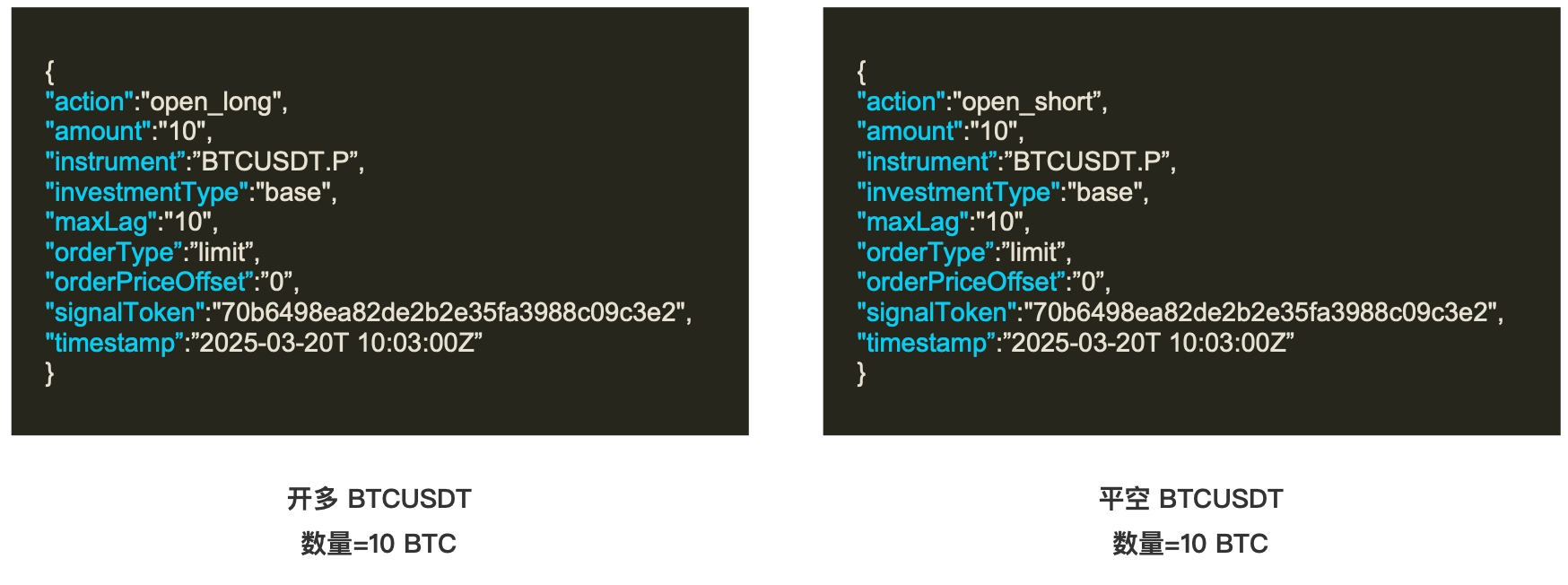
Example 2: Long Position – Reverse to Open Short
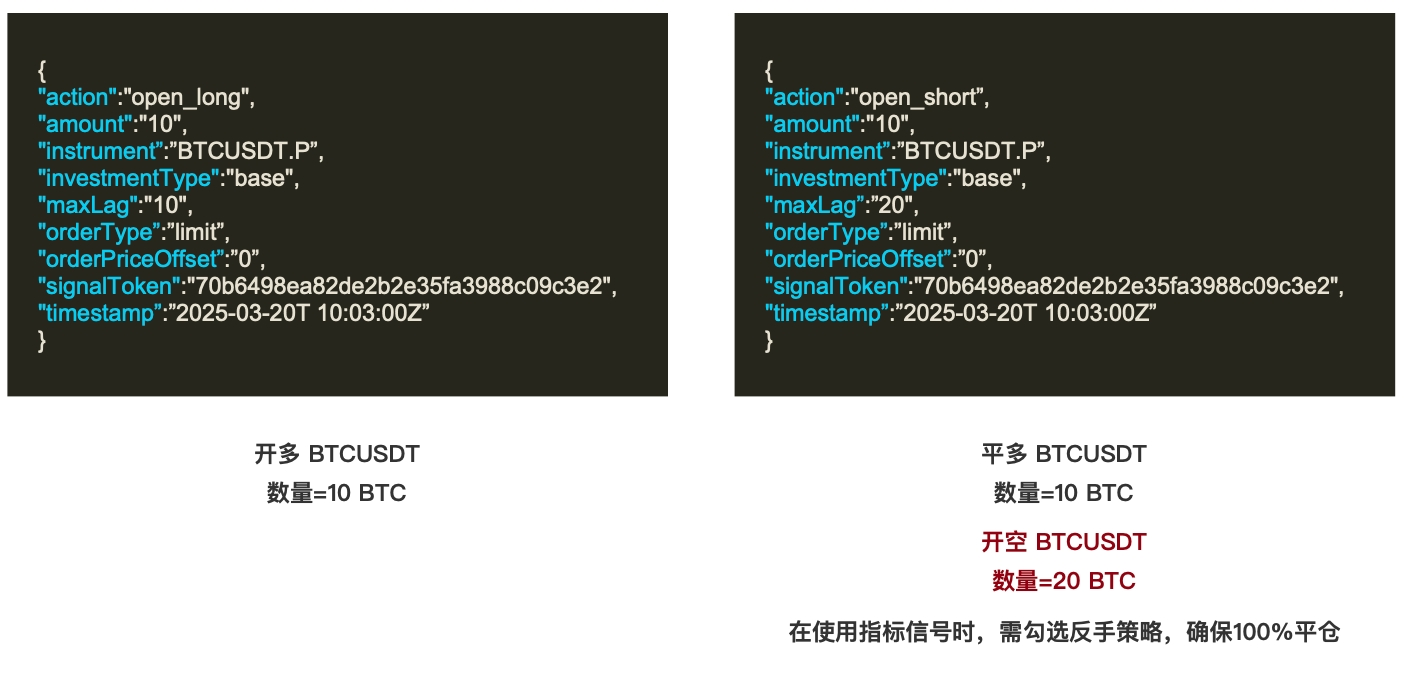
Example 3: Using Multiple Entries to Open Positions
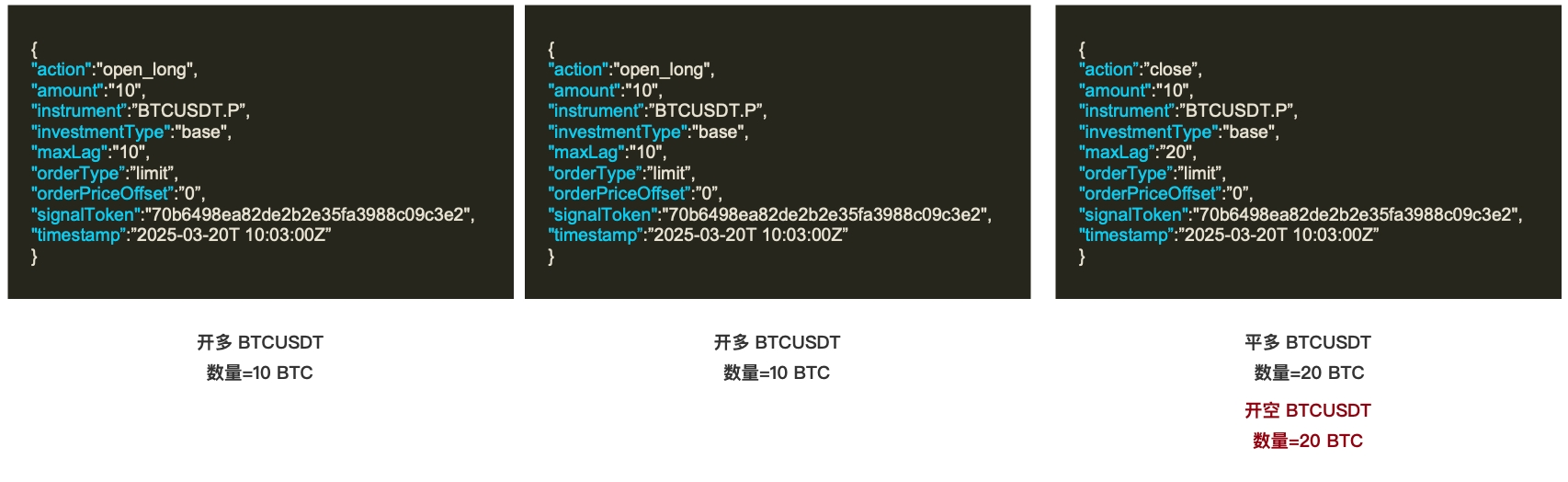
Multiple entries is a feature of signal strategies that allows multiple entries to be executed for a given instrument. Traders can refine their trading approach through entry point diversification (i.e., dollar-cost averaging), potentially increasing the chance of capturing profitable trades in dynamic market environments.